DeveloperExceptionPageMiddleware中間件利用呈現出來的錯誤頁面實現拋出異常和當前請求的詳細信息以輔助開發人員更好地進行糾錯診斷工作,而ExceptionHandlerMiddleware中間件則是面向最終用戶的,我們可以利用它來顯示一個友好的定制化的錯誤頁面。按照慣例,我們還是先來看看ExceptionHandlerMiddleware的類型定義。 [本文已經同步到《ASP.NET Core框架揭秘》之中]
1: public class ExceptionHandlerMiddleware
2: { 3: public ExceptionHandlerMiddleware(RequestDelegate next, ILoggerFactory loggerFactory, IOptions<ExceptionHandlerOptions> options, DiagnosticSource diagnosticSource);
4: public Task Invoke(HttpContext context);
5: } 6: 7: public class ExceptionHandlerOptions
8: {9: public RequestDelegate ExceptionHandler { get; set; }
10: public PathString ExceptionHandlingPath { get; set; }
11: }與DeveloperExceptionPageMiddleware類似,我們在創建一個ExceptionHandlerMiddleware對象的時候同樣需要提供一個攜帶配置選項的對象,從上面的代碼可以看出這是一個ExceptionHandlerOptions。具體來說,一個ExceptionHandlerOptions對象通過其ExceptionHandler屬性提供了一個最終用來處理請求的RequestDelegate對象。如果希望發生異常后自動重定向到某個指定的路徑,我們可以利用ExceptionHandlerOptions對象的ExceptionHandlingPath屬性來指定這個路徑。我們一般會調用ApplicationBuilder的擴展方法UseExceptionHandler來注冊ExceptionHandlerMiddleware中間件,這些重載的UseExceptionHandler方法會采用如下的方式完整中間件的注冊工作。
1: public static class ExceptionHandlerExtensions
2: {3: public static IApplicationBuilder UseExceptionHandler(this IApplicationBuilder app)=> app.UseMiddleware<ExceptionHandlerMiddleware>();
4: 5: public static IApplicationBuilder UseExceptionHandler(this IApplicationBuilder app, ExceptionHandlerOptions options)
6: => app.UseMiddleware<ExceptionHandlerMiddleware>(Options.Create(options)); 7: 8: public static IApplicationBuilder UseExceptionHandler(this IApplicationBuilder app, string errorHandlingPath)
9: { 10: return app.UseExceptionHandler(new ExceptionHandlerOptions
11: {12: ExceptionHandlingPath = new PathString(errorHandlingPath)
13: }); 14: } 15: 16: public static IApplicationBuilder UseExceptionHandler(this IApplicationBuilder app, Action<IApplicationBuilder> configure)
17: { 18: IApplicationBuilder newBuilder = app.New(); 19: configure(newBuilder); 20: 21: return app.UseExceptionHandler(new ExceptionHandlerOptions
22: { 23: ExceptionHandler = newBuilder.Build() 24: }); 25: } 26: }一、異常處理器
ExceptionHandlerMiddleware中間件處理請求的本質就是在后續請求處理過程中出現異常的情況下采用注冊的異常處理器來處理并響應請求,這個異常處理器就是我們再熟悉不過的RequestDelegate對象。該中間件采用的請求處理邏輯大體上可以通過如下所示的這段代碼來體現。
1: public class ExceptionHandlerMiddleware
2: {3: private RequestDelegate _next;
4: private ExceptionHandlerOptions _options;
5: 6: public ExceptionHandlerMiddleware(RequestDelegate next, IOptions<ExceptionHandlerOptions> options,…)
7: { 8: _next = next; 9: _options = options.Value; 10: … 11: } 12: 13: public async Task Invoke(HttpContext context)
14: {15: try
16: { 17: await _next(context); 18: }19: catch
20: { 21: context.Response.StatusCode = 500; 22: context.Response.Clear();23: if (_options.ExceptionHandlingPath.HasValue)
24: { 25: context.Request.Path = _options.ExceptionHandlingPath; 26: } 27: RequestDelegate handler = _options.ExceptionHandler ?? _next; 28: await handler(context); 29: } 30: } 31: }如上面的代碼片段所示,如果后續的請求處理過程中出現異常,ExceptionHandlerMiddleware中間件會利用一個作為異常處理器的RequestDelegate對象來完成最終的請求處理工作。如果在創建ExceptionHandlerMiddleware時提供的ExceptionHandlerOptions攜帶著這么一個RequestDelegate對象,那么它將作為最終使用的異常處理器,否則作為異常處理器的實際上就是后續的中間件。換句話說,如果我們沒有通過ExceptionHandlerOptions顯式指定一個異常處理器,ExceptionHandlerMiddleware中間件會在后續管道處理請求拋出異常的情況下將請求再次傳遞給后續管道。
當ExceptionHandlerMiddleware最終利用異常處理器來處理請求之前,它會對請求做一些前置處理工作,比如它會將響應狀態碼設置為500,比如清空當前所有響應內容等。如果我們利用ExceptionHandlerOptions的ExceptionHandlingPath屬性設置了一個重定向路徑,它會將該路徑設置為當前請求的路徑。除了這些,ExceptionHandlerMiddleware中間件實際上做了一些沒有反應在上面這段代碼片段中的工作。
二、異常的傳遞與請求路徑的恢復
由于ExceptionHandlerMiddleware中間件總會利用一個作為異常處理器的RequestDelegate對象來完成最終的異常處理工作,為了讓后者能夠得到拋出的異常,該中間件應該采用某種方式將異常傳遞給它。除此之外,由于ExceptionHandlerMiddleware中間件會改變當前請求的路徑,當整個請求處理完成之后,它必須將請求路徑恢復成原始的狀態,否則前置的中間件就無法獲取到正確的請求路徑。
請求處理過程中拋出的異常和原始請求路徑的恢復是通過相應的特性完成的。具體來說,傳遞這兩者的特性分別叫做ExceptionHandlerFeature和ExceptionHandlerPathFeature,對應的接口分別為IExceptionHandlerFeature和IExceptionHandlerPathFeature,如下面的代碼片段所示,后者繼承前者。默認使用的ExceptionHandlerFeature實現了這兩個接口。
1: public interface IExceptionHandlerFeature
2: { 3: Exception Error { get; } 4: } 5: 6: public interface IExceptionHandlerPathFeature : IExceptionHandlerFeature
7: {8: string Path { get; }
9: } 10: 11: public class ExceptionHandlerFeature : IExceptionHandlerPathFeature,
12: {13: public Exception Error { get; set; }
14: public string Path { get; set; }
15: }當ExceptionHandlerMiddleware中間件將代碼當前請求的HttpContext傳遞給請求處理器之前,它會按照如下所示的方式根據拋出的異常的原始的請求路徑創建一個ExceptionHandlerFeature對象,該對象最終被添加到HttpContext之上。當整個請求處理流程完全結束之后,ExceptionHandlerMiddleware中間件會借助這個特性得到原始的請求路徑,并將其重新應用到當前請求上下文上。
1: public class ExceptionHandlerMiddleware
2: { 3: ...4: public async Task Invoke(HttpContext context)
5: {6: try
7: { 8: await _next(context); 9: }10: catch(Exception ex)
11: { 12: context.Response.StatusCode = 500; 13: 14: var feature = new ExceptionHandlerFeature()
15: { 16: Error = ex, 17: Path = context.Request.Path, 18: }; 19: context.Features.Set<IExceptionHandlerFeature>(feature); 20: context.Features.Set<IExceptionHandlerPathFeature>(feature); 21: 22: if (_options.ExceptionHandlingPath.HasValue)
23: { 24: context.Request.Path = _options.ExceptionHandlingPath; 25: } 26: RequestDelegate handler = _options.ExceptionHandler ?? _next; 27: 28: try
29: { 30: await handler(context); 31: }32: finally
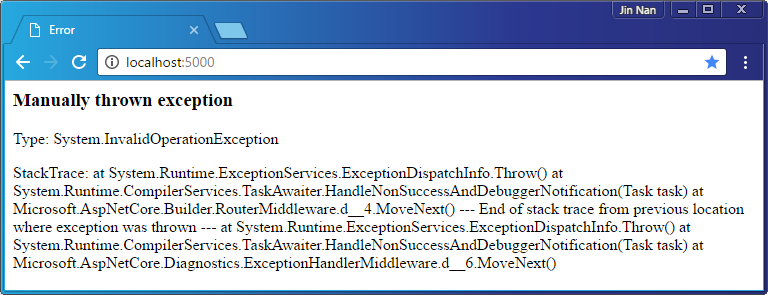
33: { 34: context.Request.Path = originalPath; 35: } 36: } 37: } 38: }在具體進行異常處理的時候,我們可以從當前HttpContext中提取這個ExceptionHandlerFeature對象,進而獲取拋出的異常和原始的請求路徑。如下面的代碼所示,我們利用HandleError方法來呈現一個定制的錯誤頁面。在這個方法中,我們正式借助于這個ExceptionHandlerFeature特性得到拋出的異常,并將它的類型、消息以及堆棧追蹤顯示出來。
1: public class Program
2: {3: public static void Main()
4: {5: new WebHostBuilder()
6: .UseKestrel() 7: .ConfigureServices(svcs=>svcs.AddRouting()) 8: .Configure(app => app9: .UseExceptionHandler("/error")
10: .UseRouter(builder=>builder.MapRoute("error", HandleError))
11: .Run(context=> Task.FromException(new InvalidOperationException("Manually thrown exception"))))
12: .Build() 13: .Run(); 14: } 15: 16: private async static Task HandleError(HttpContext context)
17: {18: context.Response.ContentType = "text/html";
19: Exception ex = context.Features.Get<IExceptionHandlerPathFeature>().Error; 20: 21: await context.Response.WriteAsync("<html><head><title>Error</title></head><body>");
22: await context.Response.WriteAsync($"<h3>{ex.Message}</h3>");
23: await context.Response.WriteAsync($"<p>Type: {ex.GetType().FullName}");
24: await context.Response.WriteAsync($"<p>StackTrace: {ex.StackTrace}");
25: await context.Response.WriteAsync("</body></html>");
26: }在上面這個應用中,我們注冊了一個模板為“error”的路由指向這個HandleError方法。對于通過調用擴展方法UseExceptionHandler注冊的ExceptionHandlerMiddleware來說,我們將該路徑設置為異常處理路徑。那么對于任意從瀏覽器發出的請求,都會得到如下圖所示的錯誤頁面。
三、清除緩存
對于一個用于獲取資源的GET請求來說,如果請求目標是一個相對穩定的資源,我們可以采用客戶端緩存的方式避免相同資源的頻繁獲取和傳輸。對于作為資源提供者的Web應用來說,當它在處理請求的時候,除了將目標資源作為響應的主體內容之外,它還需要設置用于控制緩存的相關響應報頭。由于緩存在大部分情況下只適用于成功的響應,如果服務端在處理請求過程中出現異常,之前設置的緩存報頭是不應該出現在響應報文中。對于ExceptionHandlerMiddleware中間件來說,清楚緩存報頭也是它負責的一項重要工作。
我們同樣可以通過一個簡單的實例來演示ExceptionHandlerMiddleware中間件針對緩存響應報頭的清除。在如下這個應用中,我們將針對請求的處理實現在Invoke方法中,它有50%的可能會拋出異常。不論是返回正常的響應內容還是拋出異常,這個方法都會先設置一個“Cache-Control”的響應報頭,并將緩存時間設置為1個小時(“Cache-Control: max-age=3600”)。
1: public class Program
2: {3: public static void Main()
4: {5: new WebHostBuilder()
6: .UseKestrel() 7: .ConfigureServices(svcs => svcs.AddRouting()) 8: .Configure(app => app9: .UseExceptionHandler(builder => builder.Run(async context => await context.Response.WriteAsync("Error occurred!")))
10: .Run(Invoke)) 11: .Build() 12: .Run(); 13: } 14: 15: private static Random _random = new Random();
16: private async static Task Invoke(HttpContext context)
17: {18: context.Response.GetTypedHeaders().CacheControl = new CacheControlHeaderValue
19: { 20: MaxAge = TimeSpan.FromHours(1) 21: }; 22: 23: if (_random.Next() % 2 == 0)
24: {25: throw new InvalidOperationException("Manually thrown exception...");
26: }27: await context.Response.WriteAsync("Succeed...");
28: } 29: }通過調用擴展方法 UseExceptionHandler注冊的ExceptionHandlerMiddleware中間件在處理異常時會響應一個內容為“Error occurred!”的字符串。如下所示的兩個響應報文分別對應于正常響應和拋出異常的情況,我們會發現程序中設置的緩存報頭“Cache-Control: max-age=3600”只會出現在狀態碼為“200 OK”的響應中。至于狀態碼為“500 Internal Server Error”的響應中,則會出現三個與緩存相關的報頭,它們的目的都會為了禁止緩存(或者指示緩存過期)。
1: HTTP/1.1 200 OK 2: Date: Sat, 17 Dec 2016 14:39:02 GMT 3: Server: Kestrel 4: Cache-Control: max-age=3600 5: Content-Length: 10 6: 7: Succeed... 8: 9: 10: HTTP/1.1 500 Internal Server Error 11: Date: Sat, 17 Dec 2016 14:38:39 GMT 12: Server: Kestrel 13: Cache-Control: no-cache 14: Pragma: no-cache 15: Expires: -1 16: Content-Length: 15 17: 18: Error occurred!ExceptionHandlerMiddleware中間件針對緩存響應報頭的清除體現在如下所示的代碼片段中。我們可以看出它通過調用HttpResponse的OnStarting方法注冊了一個回調(ClearCacheHeaders),上述的這三個緩存報頭在這個回調中設置的。除此之外,我們還看到這個回調方法還會清除ETag報頭,這也很好理解:由于目標資源沒有得到正常的響應,表示資源“簽名”的ETag報頭自然不應該出現在響應報文中。
1: public class ExceptionHandlerMiddleware
2: { 3: ...4: public async Task Invoke(HttpContext context)
5: {6: try
7: { 8: await _next(context); 9: }10: catch (Exception ex)
11: { 12: … 13: context.Response.OnStarting(ClearCacheHeaders, context.Response); 14: RequestDelegate handler = _options.ExceptionHandler ?? _next; 15: await handler(context); 16: } 17: } 18: 19: private Task ClearCacheHeaders(object state)
20: { 21: var response = (HttpResponse)state;22: response.Headers[HeaderNames.CacheControl] = "no-cache";
23: response.Headers[HeaderNames.Pragma] = "no-cache";
24: response.Headers[HeaderNames.Expires] = "-1";
25: response.Headers.Remove(HeaderNames.ETag);26: return Task.CompletedTask;
27: } 28: }
ASP.NET Core應用的錯誤處理[1]:三種呈現錯誤頁面的方式
ASP.NET Core應用的錯誤處理[2]:DeveloperExceptionPageMiddleware中間件
ASP.NET Core應用的錯誤處理[3]:ExceptionHandlerMiddleware中間件
ASP.NET Core應用的錯誤處理[4]:StatusCodePagesMiddleware中間件
文章列表


請先 登入 以發表留言。